Turn your videos into shorts.
We find the best moments and turn them into shorts for Instagram, TikTok, and YouTube.
“Over here, we have the bedroom areawhere the magic happens. As you can see, they have beautifully laid out rose petals...”
Multi-speaker reframing & dynamic 9:16 crop.
Watch how the engine detects the active speaker in wide studio and podcast recordings, automatically centering them inside vertical boundaries with synchronized subtitles.
How ClipViralAI works under the hood.
Inspect the actual workspace, controls, and generated results.
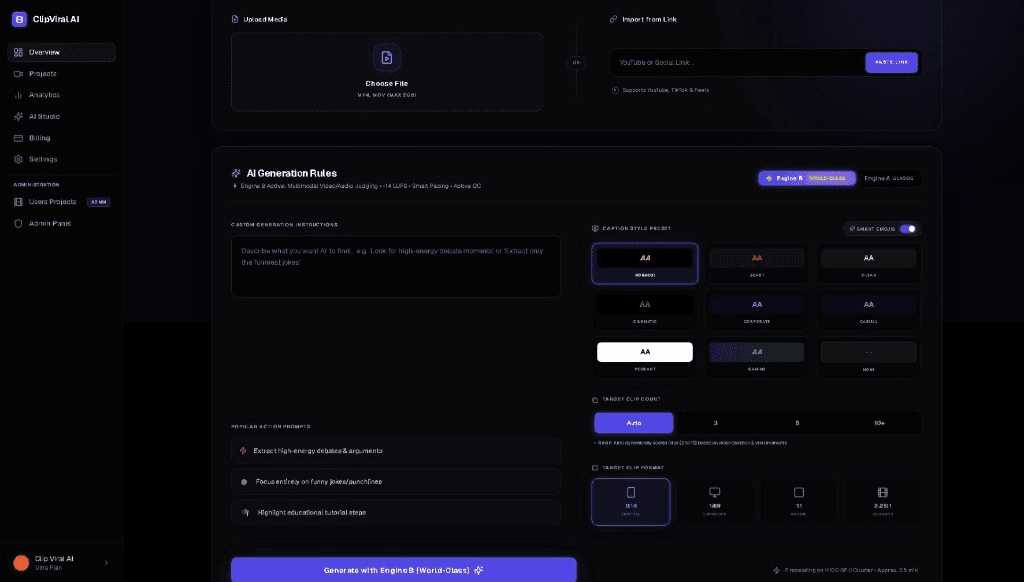
Hover or tap pins 01–04 to inspect the exact visible controls in the studio.
Add your video
Paste any public YouTube URL directly or drop raw MP4 and MOV files. The engine pulls high-resolution source video into the processing queue.
Find the best moments
Guide moment selection using natural language — instruct the model to prioritize punchlines, debate conflicts, or educational summaries.
Build your clips
Let the engine automatically discover natural narrative peaks and pause boundaries (30–90s) or specify an exact target clip count.
Add captions
Select word-synchronized caption presets. Whisper generates precise word timestamps burned directly into the finished 1080p MP4.
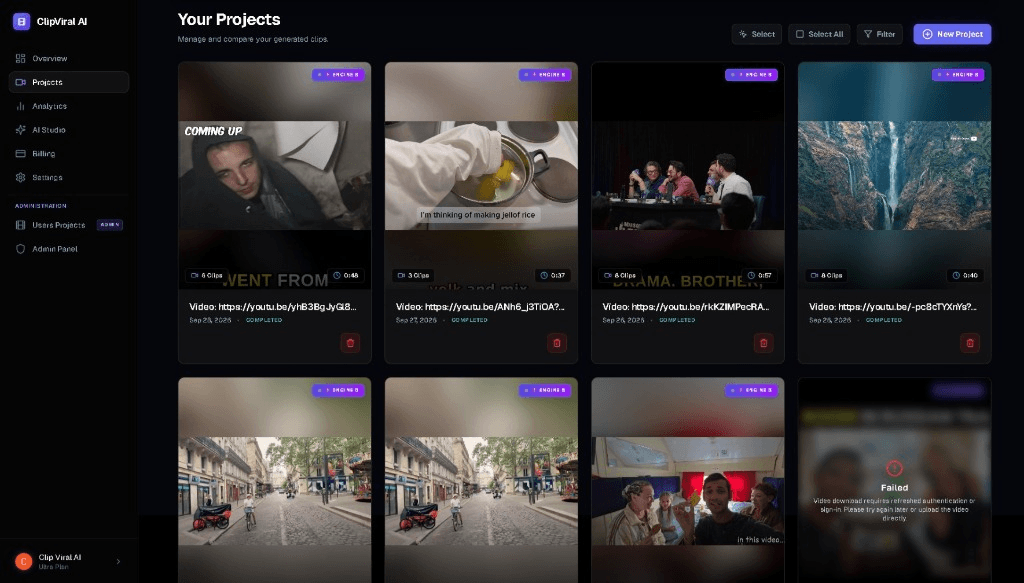
Generated clip batches organized in your library.
Each long-form video produces multiple ready-to-post short-form clips (e.g. 5 standalone clips from a single comedy podcast). Review, filter, and download 1080p MP4s at any time.
Built for any long-form video genre.
From podcasts and interviews to comedy and tutorials, ClipViralAI adapts to your recording style.
Podcasts & Interviews
Conversations naturally shift between hosts and guests. The engine identifies who is actively speaking and pans to center them in the 9:16 vertical canvas without manual keyframing.
YouTube Creators & Vlogs
Turn 20-minute travel or commentary videos into bite-sized stories. The reframing model keeps the creator centered while maintaining composition context.
Comedy & Stage Shows
Audio cadence models catch joke setups and punchlines before audience laugh breaks, keeping comedic timing intact.
Webinars, Lectures & Explanations
Extract high-value insights from hour-long workshops into digestible 60-second micro-lessons with clear, high-contrast animated subtitles.
Manual editing vs ClipViralAI
A clear comparison of the repetitive steps required in standard video editors versus an automated pipeline.
Manual NLE Workflow
- Clip DiscoveryScrubbing through the full timeline manually to find potential highlights and narrative moments.
- Reframing to 9:16Creating manual pan-and-scan keyframes to keep moving subjects inside vertical bounds.
- Subtitles & TimingTyping text, adjusting subtitle sync word-by-word, and formatting text styles across layers.
- Rendering & HardwareRendering vertical exports one-by-one on local hardware, tying up CPU and system resources.
- Editor ControlFull timeline control in heavy desktop NLE software.
ClipViralAI
- Clip DiscoveryWhisper speech analysis scans dialogue pauses and conversational peaks to identify candidate clips.
- Reframing to 9:16Face-tracking reframing automatically centers the active speaker within the 9:16 mobile canvas.
- Subtitles & TimingWord-snapped animated captions are generated and synchronized with customizable styling presets.
- Rendering & HardwareCloud-based parallel processing renders 1080p MP4 clips in the background without local load.
- Editor ControlBrowser-based editor allows quick review, boundary trimming, and caption adjustments before final export.
Plans that match your video volume.
Choose the plan that fits your production volume.
Free plan
For testing the clipping engine and editor.
- 100 credits — 20 clips on signup
- 720p export resolution
- Includes ClipViralAI watermark
- Standard processing queue
- Web browser editor access
Starter plan
For creators starting their short-form pipeline.
- 500 credits — 100 clips per month
- 720p export without watermark
- Accelerated processing
- Word-level subtitle styling
- Standard email support
Pro plan
For consistent creators needing 1080p exports.
- 1,200 credits — 240 clips per month
- Full 1080p (1080×1920) export
- No watermarks
- Priority processing queue
- Full timeline and subtitle editor
Ultra plan
For high-volume channels and production teams.
- 2,500 credits — 500 clips per month
- Full 1080p export without watermark
- Highest priority processing
- Full timeline editor suite
- Priority customer support
5 credits per generated clip · Upgrade, downgrade, or cancel anytime.
Clear, honest answers.
Everything you need to know about processing capabilities, credits, copyright, and formats.
Ready to turn your videos into shorts?
Start creating your first clips with 100 free credits.